Silverfin integration
Silverfin is a third-party service provider that offers a cloud platform for accountants.
Axis and Silverfin provide an integration to automate the synchronization of data.
Configuration
To configure this integration, you need to input the following data into your Silverfin account:
user’s email address
URL of the Axis database
name of your Axis database
Axis API key
You can create Axis external API keys either for a single database (hosting: Axis Cloud, On-premise, and Axis Cloud) or for all databases managed by a single user (hosting: Axis Cloud).
Important
These API keys are personal and provide full access to your user account. Store it securely.
You can copy the API key only at its creation. It is not possible to retrieve it later.
If you need it again, create a new API key (and delete the old one).
See also
Per database
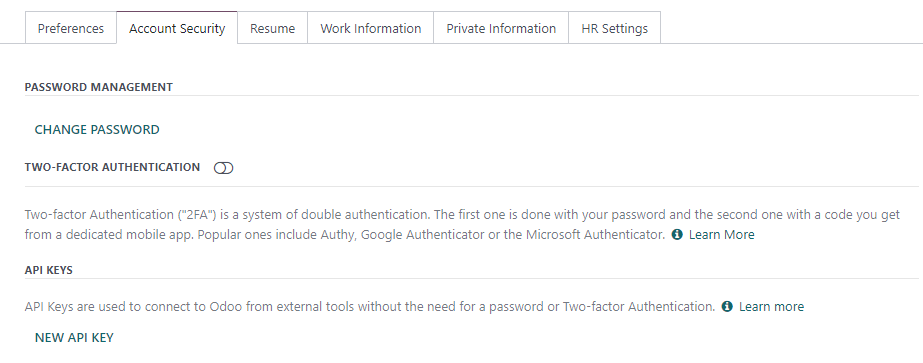
To add an API key to a single database, connect to the database, enable the developer mode, click on the user menu, and then My Profile / Preferences. Under the Account Security tab, click on New API Key, confirm your password, give a descriptive name to your new key, and copy the API key.
See also
For all databases (fiduciaries)
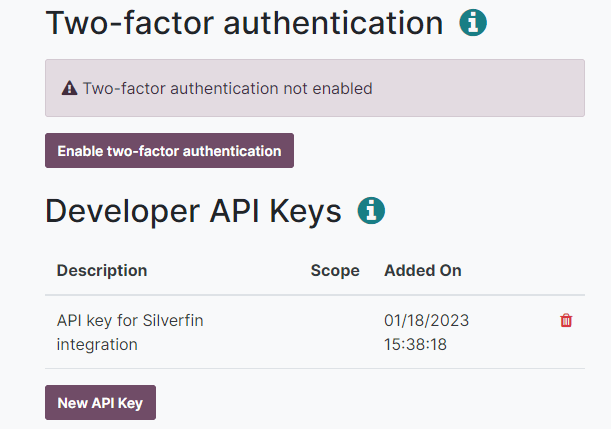
To add an API key to all databases managed by a single user at the same time (the easiest method for fiduciaries), navigate to and sign in with your administrator account. Next, open , click on New API Key, confirm your password, give a descriptive name to your new key, and copy the new API key.
Tip
Open the to view all databases that will be linked to the single API key.