Axis Phone with Axivox
Axivox is a VoIP provider that can be set up to work with Axis Phone. An Axivox account is required to use this service.
To use this service, contact Axivox to open an account. Before doing so, verify that Axivox covers the company’s area, along with the areas the company’s users wish to call.
Important
Before setting up an account with Axivox, verify the following requirements:
The business phone numbers are portable to Axivox. Some providers may be unable to release the phone number due to local or regional guidelines.
The locations of the company and its call recipients are covered by Axivox services. Axivox services are based in Europe, so international call performance may vary.
Configuration
To configure Axivox services in the Axis database, first install the Phone app.
View credentials in Axivox
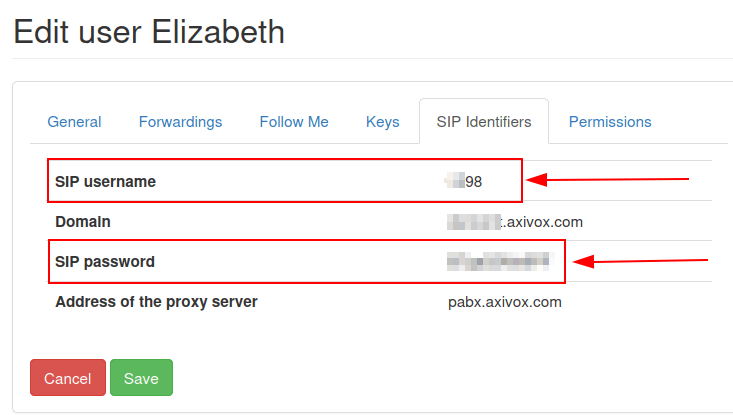
To view the necessary Axivox credentials, navigate to manage.axivox.com and log in, then go to . Click the SIP Identifiers tab to see the domain, SIP username, and SIP password.
Add Axivox credentials
After instaling the Phone - Axivox module, go to the . Locate the Axivox provider entry, and enter the following information:
OnSIP Domain: the domain that was assigned when creating an account on Axivox. Replace
YOURACCOUNTwith the company account name.VoIP Environment: select Production.

Add user credentials
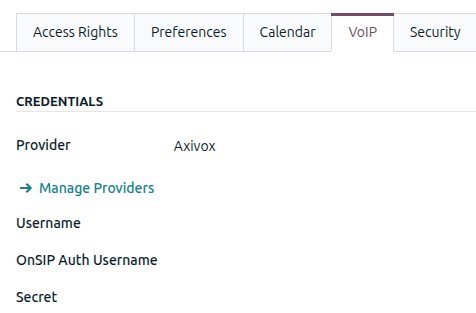
Next, each user’s Axivox credentials must be configured in Axis. Navigate to select the user, and click the VoIP tab.
Add the following Axivox credentials for the user:
Provider: select Axivox.
Username: the Axivox SIP username.
OnSip Auth Username: the Axivox SIP username.
Secret: the Axivox SIP password.
Important
Make sure to manually type the SIP password into the user’s Preferences
tab. Pasting the value causes a 401 server rejection error.